Why It Matters
It manages crawl access and budget, but it controls crawling rather than indexing, so it must be configured carefully to avoid blocking important pages.
Who Needs It
Any site, especially large ones that need to steer crawl budget away from low-value URLs.
When It's Used
Set it up at launch, and review it during audits and after structural changes.
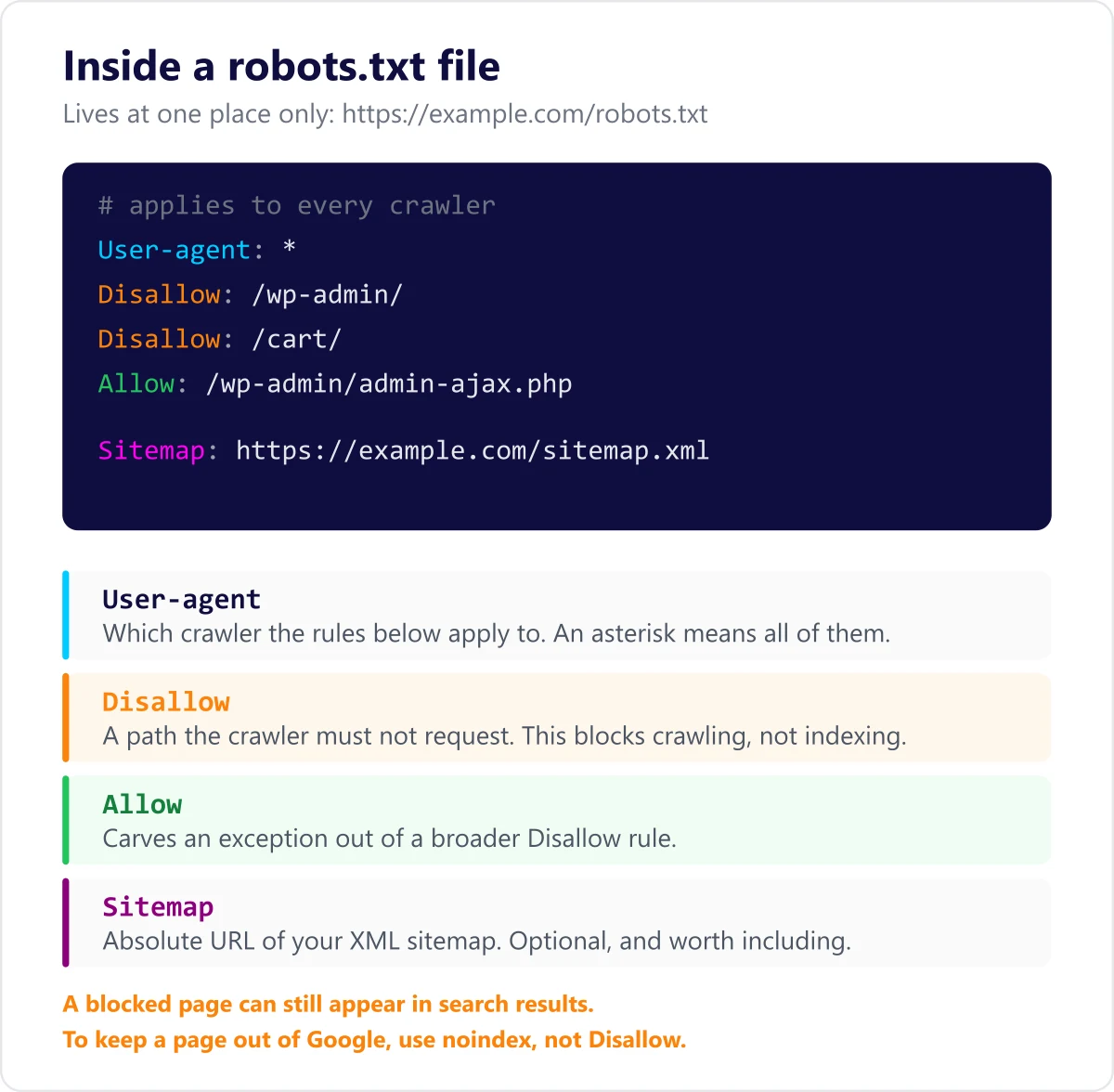
Where the file has to live
A robots.txt file only works at the root of a host, as in https://example.com/robots.txt. A file at /blog/robots.txt is ignored. Each host, protocol and port counts as a separate site, so https://example.com and https://shop.example.com each need their own, and the http and https versions are treated separately too.
What robots.txt does not do
This is the misconception that causes the most damage. Robots.txt controls crawling, not indexing. If another site links to a page you have disallowed, Google can still index that URL and show it in results, usually with no description because it was never allowed to read the page. To keep a page out of search results, use a noindex tag or password protection, and leave the page crawlable so the instruction can be read.
Blocking a page also blocks everything on it
Disallowing a directory stops crawlers requesting the CSS, JavaScript and images inside it. That can prevent Google rendering the page as a visitor sees it, which affects how it is assessed. Blocking an image directory also removes those images from Google Images.
How to check yours
- Open the file directly in a browser at yourdomain.com/robots.txt and read it.
- Use the robots.txt report in Google Search Console to see the version Google last fetched and any errors it found.
- Test specific URLs against your rules before shipping a change, because a stray slash can disallow an entire site.
- Re-check it after any migration or replatform, since a staging file that disallows everything is a common and costly thing to ship.
Common questions about Robots.txt
Does robots.txt stop a page appearing in Google?
No. It stops crawlers requesting the page, but a disallowed URL can still be indexed and listed if something links to it. Use a noindex tag for that, and keep the page crawlable so Google can see the tag.
Do I need a robots.txt file?
Not strictly. A site with nothing to block works fine without one, and a missing file simply means everything may be crawled. Most sites still add one to point at the sitemap and keep crawlers out of admin and checkout paths.
Is robots.txt case sensitive?
The file name must be all lowercase, and the paths inside it are case sensitive too. Disallow: /Admin/ will not block /admin/.
What happens if the file returns an error?
A 404 is treated as no restrictions, so everything may be crawled. A persistent 5xx error is different: Google may stop crawling the site entirely while it assumes the rules are unavailable, which makes robots.txt availability worth monitoring.
Reference: Google's robots.txt documentation
Need help with Robots.txt?
Our team can put this into practice for your site. Start with a free audit, or explore the technical seo service.
Related Terms
Crawlability is how easily a search engine's bots can discover and access a site's pages by following links and directives such as robots.txt.
IndexabilityIndexability is whether a crawled page is eligible to be stored in a search engine's index, governed by signals like noindex tags, canonicals, and content quality.
Technical SEOTechnical SEO is the practice of making a website easy for search engines to crawl, render, and index. It covers site architecture, speed, structured data, and indexation controls.
Last updated: 2026-08-28