
What is image SEO?
Image SEO is the practice of optimizing the images on a page so they help search visibility rather than hurt it. It covers how images are described, named, sized, and marked up, and it touches both on-page SEO and page performance.
Done well, image SEO helps images appear in Google Images, keeps pages fast, and makes content accessible to everyone. Done poorly, heavy or undescribed images drag down both rankings and experience.
Why image SEO matters
Images influence more than looks. They affect Core Web Vitals, since large, unoptimized images are a common cause of slow loading and layout shift. They open a traffic channel through Google Images. And they support accessibility, because alt text lets screen readers describe images to visually impaired users.
Search engines cannot see an image the way people do, so they rely on the text and signals around it to understand and rank it. Google’s image SEO best practices cover the specifics.
How to optimize images
Apply these to every meaningful image on a page.
- Write real alt text. Describe what the image shows, in plain language, so it helps both accessibility and search. Do not stuff keywords.
- Use descriptive file names. Name the file for its content, like “map-pack-example.webp”, not “IMG_4821.jpg”.
- Compress and use modern formats. Serve appropriately sized images in formats like WebP to cut file size without losing quality.
- Set width and height. Reserve space so the layout does not shift as images load, which protects your CLS score.
- Use lazy loading. Defer offscreen images so the initial view loads faster.
- Add structured data where relevant. Structured data can make images eligible for richer image results.
Because several of these touch performance, image SEO overlaps with your technical SEO foundation.
The image tag, attribute by attribute
Most image SEO happens inside one HTML element. Here is a complete image tag with every attribute that matters for search and speed.
<img
  src="/images/map-pack-example.webp"
  alt="Google map pack showing three local plumbing companies"
  width="1200"
  height="675"
  loading="lazy"
  decoding="async">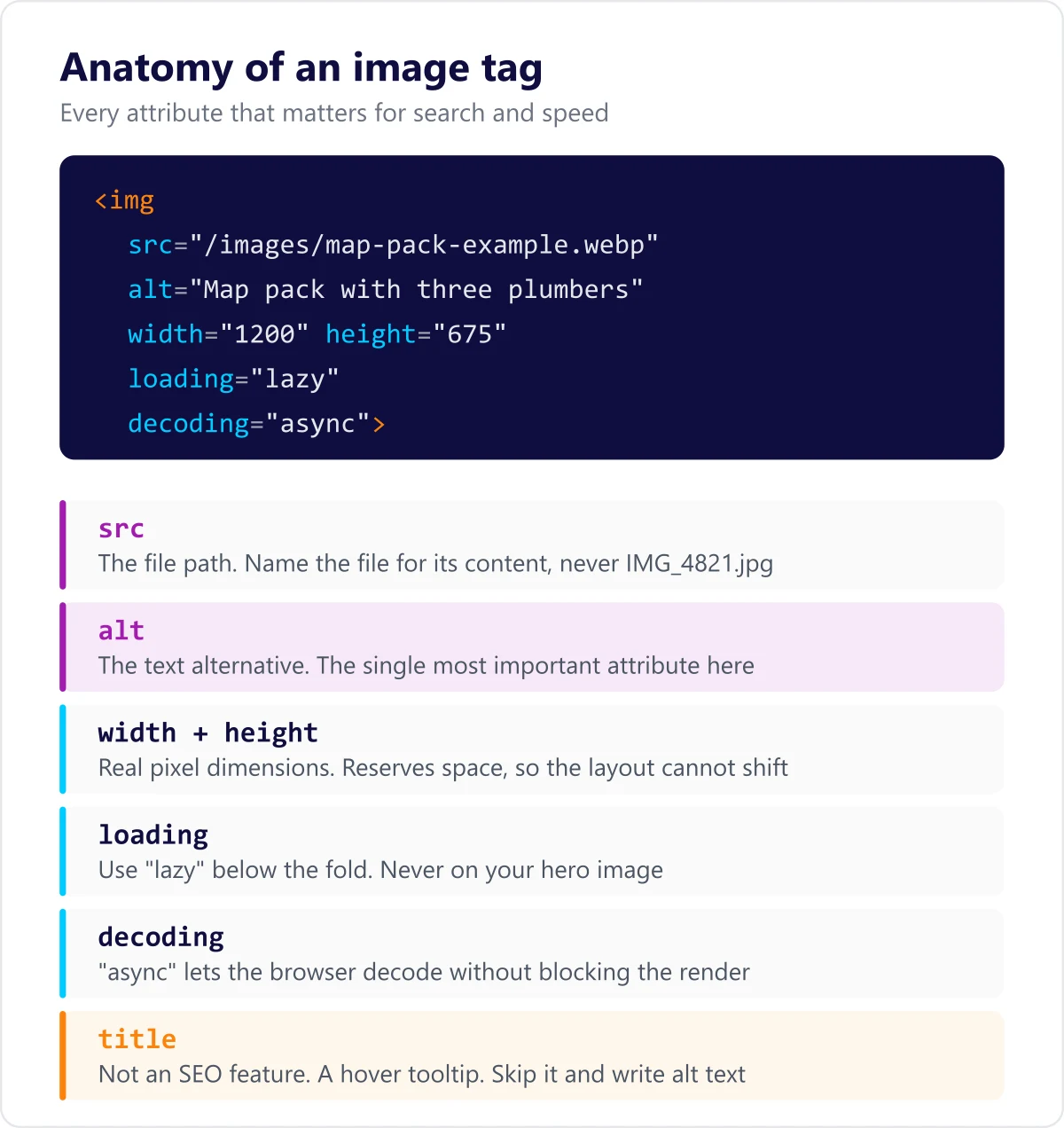
What each part is doing:
- src. The file path. Give the file a descriptive name, because the file name is one of the signals Google reads when it has little else to go on.
- alt. The text alternative. This is the single most important attribute for both accessibility and image search.
- width and height. The image’s real pixel dimensions. Declaring them lets the browser reserve the right space before the file arrives, which is what prevents layout shift.
- loading. Set this to “lazy” for images below the fold so they do not compete with content the visitor can already see. Leave it off your largest above-the-fold image, because lazy loading that one delays your Largest Contentful Paint.
- decoding. Setting “async” lets the browser decode the image without holding up the rest of the render.
There is also a title attribute. It is not an SEO feature. It shows a tooltip on hover, most screen readers ignore it, and it is no replacement for alt text. Leave it out unless you have a specific reason to use it. The full attribute list is documented in MDN’s reference for the image element.
Alt text done right
Alt text should describe the image concisely and accurately, as if you were reading the page aloud to someone who cannot see it. If the image is purely decorative, it can take empty alt text so screen readers skip it. Where a keyword fits the description naturally, it is fine to include, but never force one in.
Four different pieces of text can attach to one image, and they do different jobs:
- Alt text describes the image for people who cannot see it and for search engines. Always write it for meaningful images.
- The file name describes the file before anyone reads the page. Set it once, at upload.
- The caption is visible text below the image. People actually read captions, so use them when the image needs explaining.
- The title attribute is a hover tooltip. It is the least useful of the four and safe to skip.
Write alt text for the reader who cannot see the image. That instruction alone produces better alt text than any keyword rule.
Which image format to use
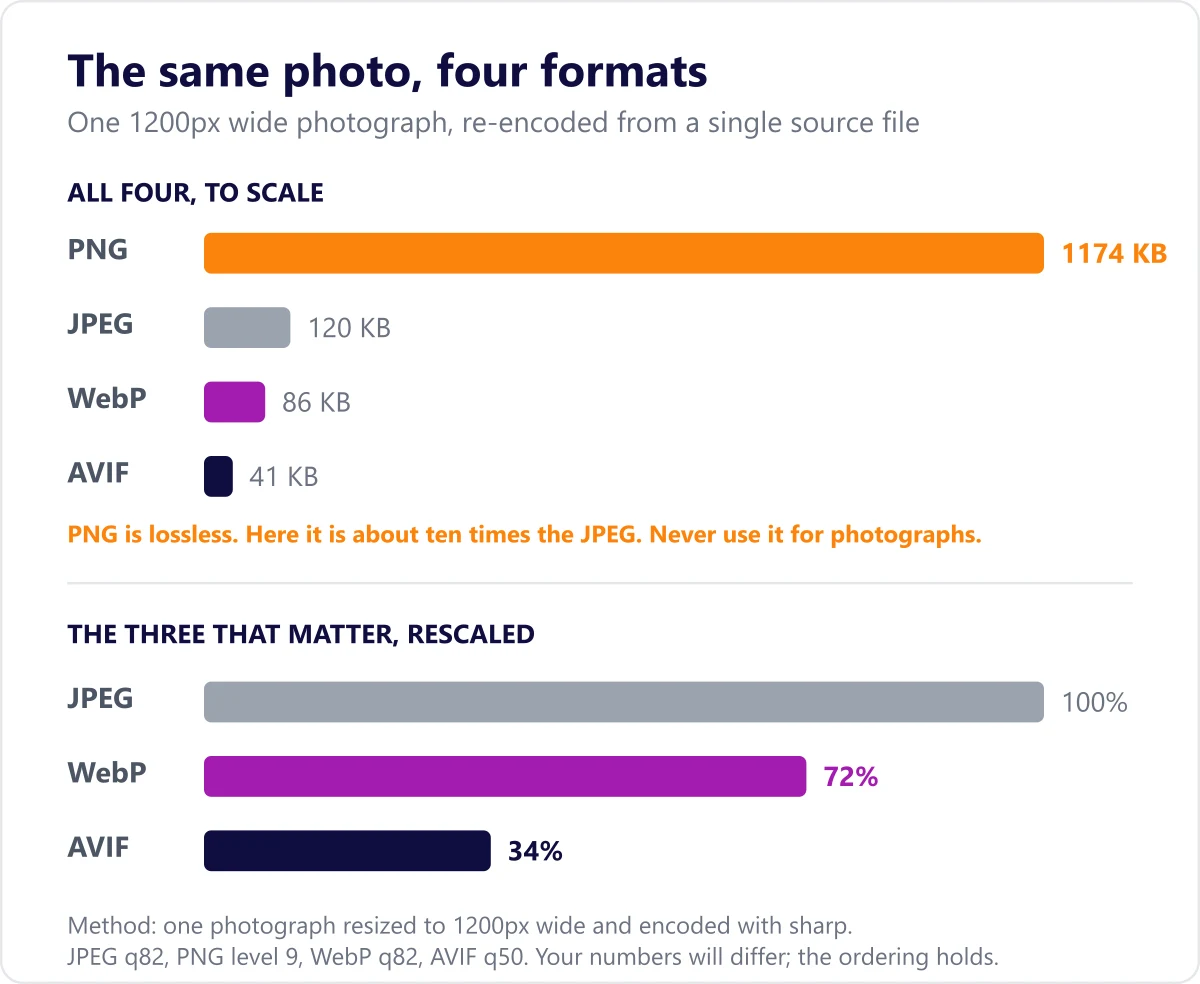
Format choice is mostly a file size decision, and file size is a speed decision.
| Format | Best for | Worth knowing |
|---|---|---|
| WebP | Almost everything | Smaller than JPEG and PNG at similar quality, supports transparency, and is supported in every current browser. The sensible default. |
| AVIF | Large photographs | Smaller again than WebP, at the cost of slower encoding. Serve it with a WebP or JPEG fallback. |
| JPEG (.jpg) | Photographs | The universal fallback. Still fine, but a WebP version of the same photo is usually noticeably smaller. |
| PNG | Screenshots, sharp edges, transparency | Lossless and therefore heavy. Do not use it for photographs. |
| SVG | Logos, icons, diagrams | Vector, so it stays sharp at any size and is usually tiny. Not suitable for photographs. |
The practical rule: use SVG for anything drawn, WebP for anything photographed, and keep a JPEG fallback if you support older browsers.
Responsive images and lazy loading
Sending a 2000 pixel wide image to a phone that will display it at 400 pixels wastes most of the download. Responsive images let the browser pick the right file.
<img
  src="/images/hero-800.webp"
  srcset="/images/hero-400.webp 400w,
          /images/hero-800.webp 800w,
          /images/hero-1600.webp 1600w"
  sizes="(max-width: 600px) 400px, 800px"
  alt="Team reviewing a search performance dashboard"
  width="800"
  height="450">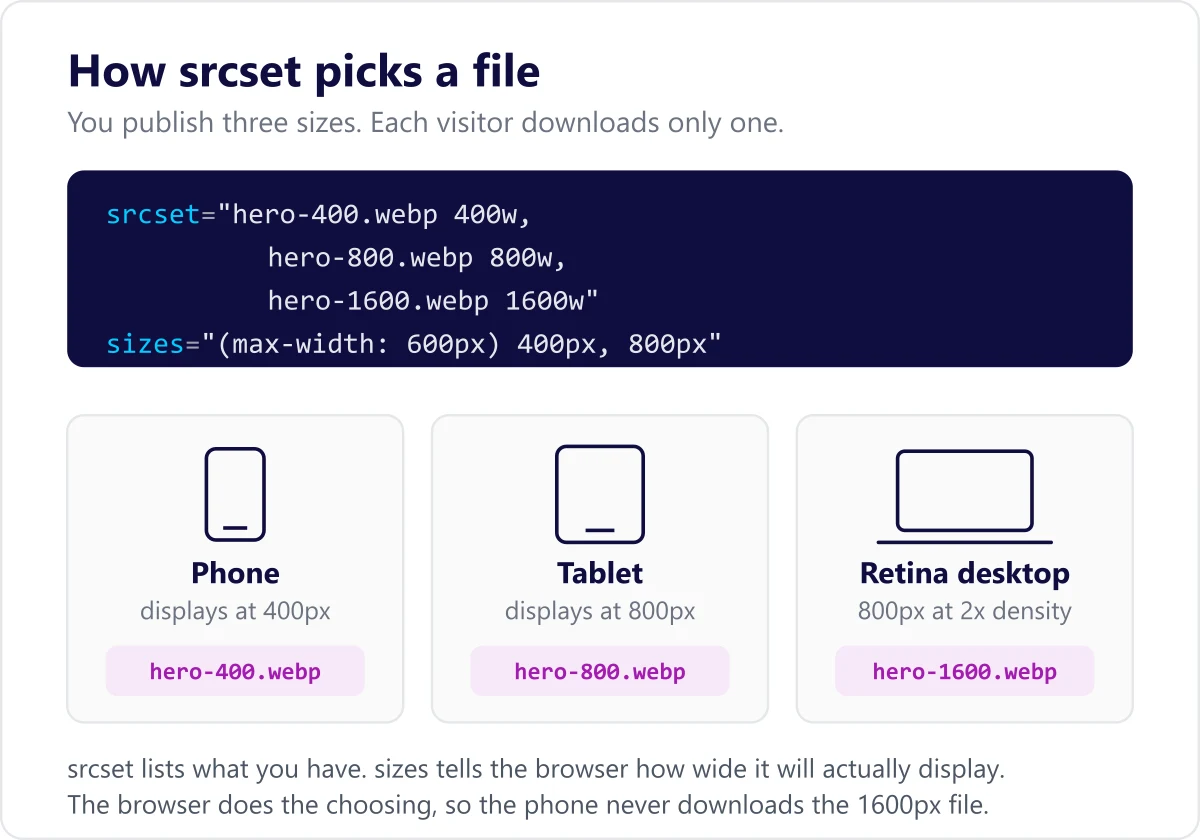
The srcset attribute lists the versions you have made, sizes tells the browser how wide the image will actually display, and the browser downloads only the file it needs.
Lazy loading is the other half. Deferring offscreen images shortens the initial load, but be deliberate about it. Lazy loading your hero image delays the very element Google measures for Largest Contentful Paint, so exclude that one.
How to get images into Google Images
Image search is a real traffic channel, and it is easy to be invisible in it by accident.
- Let Googlebot-Image crawl your images. If your robots.txt blocks the image crawler or your image directory, nothing else here matters.
- Host images on a URL that can be crawled. Images loaded only by script, or referenced only in CSS backgrounds, are much harder for search engines to find.
- Put the image near relevant text. Google uses the surrounding content to understand what an image shows, so an image dropped into an unrelated section is working against you.
- Consider an image sitemap. If your images live on a CDN or load through script, listing them in a sitemap is how you make sure they get discovered. Google documents the format in its image sitemaps guide, and it can extend your existing XML sitemap.
Common image SEO mistakes
- Missing or unhelpful alt text.
- Generic file names like “IMG_1234.jpg”.
- Uploading huge, uncompressed images that slow the page.
- No set dimensions, which causes layout shift as images load.
- Keyword-stuffed alt text that hurts accessibility and reads as spam.
- Lazy loading the hero image, which delays the exact element Core Web Vitals measures.
- Uploading a 4000 pixel image and resizing it with CSS, so the visitor downloads the full file anyway.
- Blocking the image crawler in robots.txt and wondering why nothing appears in image search.
An image SEO checklist
Run this over any page before you publish it.
- Every meaningful image has descriptive alt text, and decorative images have empty alt text.
- File names describe the content.
- Images are served as WebP or AVIF where possible.
- No image is significantly larger than the space it displays in.
- Width and height are set on every image.
- Offscreen images are lazy loaded, and the hero image is not.
- The image crawler is allowed in robots.txt.
- Images sit next to the text they relate to.
Frequently asked questions
Does alt text help SEO?
Yes, in two ways. It helps search engines understand the image, which supports image search, and it makes your page accessible, which is a quality signal in its own right.
What image format is best for SEO?
Modern formats like WebP usually give the best balance of quality and file size, which helps page speed. The right choice also depends on the image, but smaller, well-compressed files are the goal.
Do images affect page speed and ranking?
Yes. Large, unoptimized images are a leading cause of poor Core Web Vitals, which affects both rankings and how many visitors stay. Optimizing them is one of the most common speed wins.
Is photo SEO the same as image SEO?
Yes. Photo SEO, picture SEO, and image SEO all describe the same work: naming, describing, compressing, and marking up the images on your pages so they are understood by search engines and fast for visitors.
Does the image title attribute help rankings?
No. The title attribute produces a hover tooltip, most screen readers ignore it, and there is no evidence it influences rankings. Put your effort into alt text and the file name instead.
Do I need an image sitemap?
Only if your images are hard to discover, which usually means they load through script or sit on a separate CDN. If your images are plain image tags in your HTML, your normal sitemap and internal links are generally enough.
How many images should a page have?
There is no target number. Use the images the content genuinely needs to be clearer, and optimize each one. Adding images purely for SEO adds weight without adding value.
Part of our complete on-page SEO guide.
Want images that rank and load fast? Explore our On-Page SEO service or start with a free SEO audit.