
Headless CMS Explained: Pros, Cons, and Real-World Examples
1. Introduction: Why Headless CMS Matters Now
Today’s digital landscape is no longer a simple collection of webpages. Businesses are now expected to deliver consistent brand messaging on their marketing site, provide real-time product data in their mobile app, and power dynamic digital signage in-store, often from siloed, legacy systems that make this an operational nightmare. This omnichannel reality presents a significant challenge for traditional content management systems that were never designed for such complexity.
Platforms like WordPress were built for a simpler, webpage-oriented world. In these traditional, or “monolithic,” systems, the content is deeply intertwined with the code that displays it (HTML and CSS). As a result, the content is effectively trapped in a single format, a webpage, making it nearly impossible to reuse efficiently across a mobile app or a digital kiosk. This commingling of content and code means that to deliver an experience on a new channel, you often have to start from scratch.
In my experience, the conversation has shifted from “Should we consider headless?” to “How do we implement headless?” for any organization serious about its digital future. The limitations of the old model have become a critical bottleneck for growth and innovation.
This guide is designed to cut through the noise. You will learn, in plain English, what a headless CMS is and how its architecture fundamentally differs from traditional systems. We will explore the real-world benefits and drawbacks, examine popular platforms, and provide clear guidance on whether a headless approach is the right choice for your team.
2. What Is a Headless CMS?
To appreciate the power of a headless CMS, it’s crucial to understand the core architectural difference that sets it apart. At its heart, the concept is quite simple.
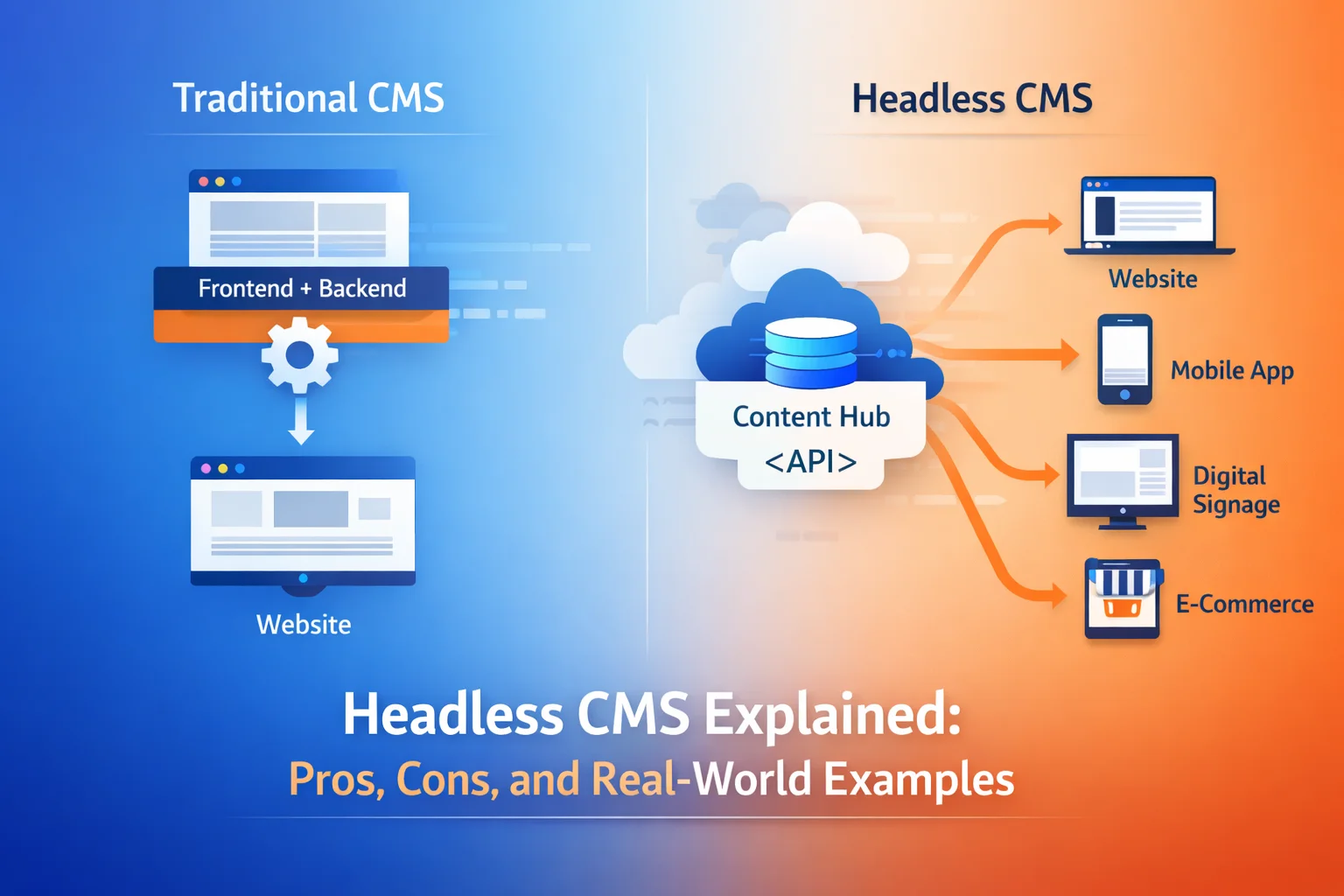
A headless CMS is a content management system that separates the content repository and management interface (the “body”) from the presentation layer (the “head”). It functions as a back-end-only content hub where you can create, manage, and store your content.
Instead of being locked into a specific website template, this content is made accessible via an Application Programming Interface (API). This allows developers to retrieve the content and deliver it to any front-end or device they choose, whether it’s a website built with a modern framework, a native mobile app, or an IoT device.
The Sanity team offers a perfect analogy: the professional recording studio.
- A traditional CMS is like a single-track basement recording. The lyrics, instruments, and vocals are all mixed together on one track. You can play the song back, but you can’t easily isolate the guitar to remix it. The content and its presentation are stuck together.
- A headless CMS is like a professional studio where each instrument and vocal is recorded on a separate, pristine track. A sound engineer can then take these individual tracks and remix them in infinite ways, for the radio, for a movie soundtrack, or for a live performance. The content is pure, structured, and ready to be adapted for any context.
Architecturally, the difference is stark:
| Traditional (Monolithic) CMS: All-in-One | Headless CMS: Separated & Flexible |
| A single, tightly-coupled system contains the database, content management tools, design templates, and the final front-end presentation layer. Everything is in one box. | The content management back-end is a separate system (the “body”). It provides content via an API to any number of independent front-end applications (the “heads”), such as a website, mobile app, or smart display. |
This fundamental separation of concerns is what unlocks the powerful benefits we’ll explore next.
3. The Benefits of a Headless CMS
Adopting a headless CMS is more than a technical upgrade; it’s a strategic decision that provides key competitive advantages in the modern digital economy. These benefits empower organizations to move faster, adapt to new technologies, and reach customers wherever they are.
- Omnichannel Delivery (“Create Once, Publish Everywhere”) Because content is stored in a raw, format-agnostic way and delivered via an API, it can be seamlessly published across any channel from a single source of truth. This is the core principle of “Create Once, Publish Everywhere” (COPE). Instead of copying and pasting content for your website, mobile app, and in-store displays, you manage it once from one centralized hub and publish it everywhere. For example, Restaurant Brands International (parent company of Burger King) uses Sanity to manage content for over 29,000 restaurants, ensuring consistency across a vast network of digital touchpoints.
- Developer Freedom and Flexibility Developers are no longer constrained by the rigid templates and specific technology stack (like PHP) of a monolithic system. A headless architecture allows them to use their preferred modern front-end frameworks, such as Next.js, React, Vue, Svelte, or Astro, and the best tools for the job. This freedom leads to faster development cycles, higher-quality code, and ultimately, better and more performant user experiences.
- Enhanced Performance and Speed Headless architectures are a natural fit for modern front-end frameworks and deployment services that use global Content Delivery Networks (CDNs). This combination results in significantly faster website load times. Since page speed is a critical factor for both user experience (reducing bounce rates) and search engine optimization (SEO), this is a major advantage over the often-slower rendering processes of traditional CMS platforms.
- Greater Scalability Modern headless platforms, especially Software-as-a-Service (SaaS) solutions, are built on cloud-native infrastructure designed for effortless scaling. As your traffic grows or you add new brands and channels, the managed back-end handles the increased load without requiring you to maintain servers or worry about performance bottlenecks. This stands in stark contrast to the costly and complex process of scaling a self-hosted traditional CMS.
- Improved Security By separating the content management back-end from the public-facing presentation layer, the potential attack surface is significantly reduced. The content database and authoring environment are not directly accessible from the front-end, making them less vulnerable to common web-based attacks.
However, this level of flexibility and power introduces a new set of challenges that teams must be prepared for.
4. The Disadvantages of a Headless CMS
While the benefits are compelling, it’s crucial to approach a headless architecture with a clear understanding of its potential downsides. The same flexibility that empowers developers can create significant hurdles for teams that aren’t prepared for the shift in workflow and resources.
- Increased Technical Complexity and Dependency on Developers A headless CMS requires a higher degree of technical proficiency. Since there is no built-in front-end, your organization is responsible for building and maintaining its own presentation layer from scratch. This creates a strong dependency on development teams for the initial setup, major updates, and even some day-to-day functionalities. Honestly, this is where many teams get stuck; you can’t just install a theme and start publishing. For a marketing team, this means that changing a page layout, an action that might be a simple drag-and-drop in a traditional CMS, now requires filing a ticket with the development team, potentially slowing down campaign launches.
- Higher Initial Cost and Effort The necessity of custom-building the front-end can lead to higher initial setup costs and a longer time-to-market compared to using a pre-built template in a traditional CMS. While a headless approach can be more cost-effective in the long run for complex, omnichannel projects, the upfront investment in development resources can be a significant barrier for smaller projects or teams with tight budgets.
- Content Preview Challenges Because the “head” (presentation layer) is completely disconnected from the “body” (content back-end), it can be difficult for content creators to see a live preview of how their content will look on the final website or app. This can disrupt editorial workflows and require developers to build custom preview environments. It’s worth noting that some modern platforms like Storyblok directly address this pain point by offering a “Visual Editor” that provides an in-context, WYSIWYG editing experience.
Understanding these trade-offs is key to selecting the right tool, so let’s look at some of the most popular headless CMS platforms on the market today.
5. Headless CMS Examples (Real-World)
The headless CMS market is diverse, with options ranging from developer-focused open-source platforms to feature-rich enterprise SaaS solutions. Here are a few leading examples that illustrate the variety of approaches and their common use cases.
Contentful
Contentful is an API-first, composable content platform designed for enterprise-scale operations. It enables large teams to assemble content from various sources into a centralized hub and reuse it across any digital experience, from websites to mobile apps and beyond.
Strapi
Strapi is the leading open-source headless CMS. It is 100% Javascript and fully customizable, built with a developer-first philosophy that is ideal for teams who want complete control over their code, data, and hosting environment.
Sanity
Sanity is a platform for structured content that excels at real-time collaboration. It is known for its open-source, fully customizable editor, Sanity Studio, which is built in React and allows developers to create highly tailored authoring experiences.
Prismic
Prismic is a headless website builder for Jamstack sites, valued for its intuitive content creation interface and robust development tools. It is trusted by major companies like Google and Netflix to power their web experiences.
Storyblok
Storyblok is a headless CMS whose unique selling proposition is its Visual Editor. This feature is designed to bridge the gap between developers and marketers by allowing content teams to edit and preview content in a live, visual context, much like a traditional CMS, but with the flexibility of a headless architecture.
While these platforms were built to be headless from the ground up, many wonder if the world’s most popular traditional CMS can also be used this way.
6. Can WordPress Be Used as a Headless CMS?
Given its massive market share, a common question is whether it’s possible to use WordPress in a headless configuration.
The answer is yes, WordPress can be used as a headless CMS. This is possible because modern versions of WordPress include a built-in REST API, which exposes all content (posts, pages, etc.) as structured data. Furthermore, its rich plugin ecosystem offers extensions that enable other API methods like GraphQL, providing developers with flexible ways to retrieve content.
However, it’s important to understand the pros and limitations of this approach.
- Pros: Teams that are already deeply familiar with the WordPress admin interface can continue using it for content management. This allows them to leverage years of experience, a vast ecosystem of plugins, and a massive community for support, all while powering a modern front-end application.
- Limitations: Many experts describe a traditional CMS with an added API as ‘decoupled’ rather than truly ‘headless.’ Because WordPress was fundamentally built as a monolithic, page-oriented system, its headless capabilities are an add-on, not a native feature. This can result in lower performance and less flexibility for true omnichannel content modeling compared to a platform designed from the ground up to be API-first.
Using WordPress headlessly makes the most sense for teams heavily invested in its ecosystem who need to add a modern front-end or a new channel to their existing setup without completely re-platforming their content operations.
7. Who Should (and Shouldn’t) Use a Headless CMS?
The decision to adopt a headless CMS is a strategic one that depends entirely on your organization’s goals, resources, and technical capabilities. It’s a powerful tool, but it’s not the right fit for every project.
Who Should Use a Headless CMS
- Organizations Needing Omnichannel Delivery: Any business that publishes content to multiple platforms, such as websites, native mobile apps, e-commerce storefronts, digital signage, or IoT devices.
- Development Teams Using Modern Frameworks: Teams that want to build fast, secure, and dynamic experiences using technologies like React, Next.js, or Vue and require full control over the front-end presentation.
- Growing Businesses and Enterprises: Companies that need a scalable, flexible, and future-proof architecture to support multiple brands, regions, or future digital touchpoints without being locked into a single technology.
- eCommerce and Media Companies: Industries that need to seamlessly combine editorial content with product data from platforms like Shopify or deliver high-performance, content-rich experiences quickly.
Who Shouldn’t Use a Headless CMS (or Should Be Cautious)
- Small Businesses or Non-Technical Users: Individuals or small teams without dedicated developer resources who need to launch a simple website quickly and affordably. In my practice, this is the most common reason to stick with a traditional CMS, if you don’t have a dedicated developer, the added complexity of headless will quickly outweigh its benefits.
- Teams on a Tight Initial Budget: Projects where the upfront cost and time required to design and develop a custom front-end is prohibitive.
- Simple Blogs or Brochure Websites: Use cases where the primary goal is a single website and there are no foreseeable plans for omnichannel content distribution. The added complexity of a headless setup is often unnecessary.
Ultimately, the decision comes down to a strategic evaluation of your organization’s needs.
8. Conclusion: Is a Headless CMS Worth It?
A headless CMS represents a fundamental shift in how we think about digital content, from static pages to fluid, reusable assets. It is an incredibly powerful and flexible solution built for the complexity of the modern digital era. However, it is not a one-size-fits-all answer. The initial investment in development and the shift in workflow are significant considerations that cannot be overlooked.
The choice between a traditional and a headless CMS boils down to a few core questions you must ask your team:
- Evaluate your goals: Do you need to deliver content to multiple channels now or in the foreseeable future?
- Assess your team’s skills: Do you have the development resources to build and maintain a custom front-end?
- Plan for the long term: Is your digital strategy built for flexibility, scalability, and future growth?
The question is not whether a headless CMS is worth the investment, but whether your organization can afford to remain trapped in a content architecture that cannot scale with your ambition. For organizations ready to treat content as a strategic, reusable asset, a headless CMS isn’t just worth it, it’s the foundation for building the next generation of digital experiences.